Midjourney Review: Features, Pricing, Pros & Cons
Imagine turning your thoughts into art—literally. Midjourney makes that possible. It’s an AI-powered tool that transforms simple text prompts into breathtaking visuals with an imaginative edge no other platform quite matches.
In a world where content demands speed and originality, Midjourney solves the creative gap. No more waiting on freelance illustrators or struggling with design software. Type what you envision, and Midjourney draws it for you—in seconds.
From graphic designers and marketers to game developers, educators, authors, and social media managers, Midjourney empowers creators who want more impact, less hassle, and jaw-dropping visuals that don’t look like they came from a machine.
Company Background
Midjourney is the brainchild of David Holz, co-founder of Leap Motion. Founded in 2021 and based in San Francisco, Midjourney started as a research lab exploring the boundaries of human-computer creativity. But what began as an experiment quickly turned into one of the most talked-about AI tools on the internet.
Its development is intentionally rooted in community. Unlike most software, Midjourney doesn’t rely on a traditional app or dashboard. Instead, it runs through Discord, creating a unique, collaborative experience where creators inspire and challenge each other daily.
Visit them at midjourney.com.
Key Features
Image Generation via Text
Type in a text prompt like “a neon dragon flying over Tokyo” and Midjourney delivers four artistic renderings. Choose your favorite, upscale it, or create more variations instantly.
Advanced Prompt Control
Midjourney isn’t just about random surprises. Use modifiers like:
--arfor aspect ratio--vfor style version--stylizeto influence creativity--chaosto add randomness
You can even upload reference images or mix multiple prompts for hybrid creations.
Fast, Relaxed, and Draft Modes
- Fast Mode: Immediate results using GPU credits
- Relax Mode: Unlimited generations (on higher plans), processed in a queue
- Draft Mode: A quick preview mode that’s cheaper on GPU time
Remix & Region Editing
Need to tweak a specific section of an image? With Vary (Region) and Remix, you can selectively edit parts of a generated image while preserving the rest.
Web Editor
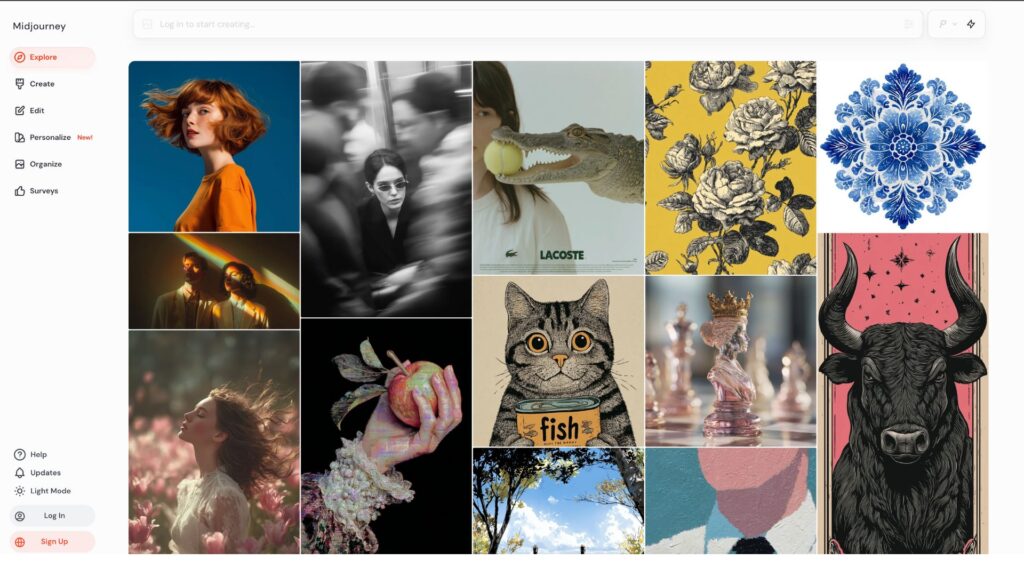
In 2024, Midjourney added a web-based editor, allowing easier access to your images, upscales, prompt history, and direct editing, without needing to scroll through endless Discord threads.
Community Showcase
Every image generated can become a conversation starter. Share your creations in public rooms, join themed contests, and discover unexpected styles and prompt ideas from thousands of daily users.
Commercial Licensing
Pro users gain full rights to use generated content for commercial purposes—no fine print, just creative freedom.
User Interface and Experience (UI/UX)
Midjourney is different. Instead of launching a dashboard or app, you interact via Discord commands. Type /imagine, add your prompt, and watch the magic unfold.
For those new to Discord, the learning curve can feel steep. But once you get the hang of it, it becomes second nature—almost like chatting with your own private design assistant.
With the web editor now live, you also get access to your image library, upscale options, and editing tools in a more familiar UI. It’s a much-needed upgrade that blends the creative chaos of Discord with the clarity of traditional interfaces.
On mobile, Midjourney works through the Discord app, so you can create on the go. While not perfect, it’s functional and responsive.
Platforms Supported
| Platform | Supported | Notes |
|---|---|---|
| Discord (Windows/macOS/Linux) | ✅ | Primary method for prompting and viewing creations |
| Web Editor | ✅ | Easy-to-use image manager and editing suite |
| iOS / Android | ✅ | Via Discord app; works well but less intuitive |
| Offline Mode | ❌ | Requires internet and Discord access |
Pricing
Midjourney’s pricing is based on GPU time—the processing power needed to create your art.
| Plan | Price (Monthly) | GPU Fast Hours | Stealth Mode | Commercial Use | Best For |
|---|---|---|---|---|---|
| Basic | $10 | 3.3 hrs | ❌ | ✅ | Beginners, hobbyists |
| Standard | $30 | 15 hrs + Relax | ❌ | ✅ | Frequent creators |
| Pro | $60 | 30 hrs + Relax | ✅ | ✅ | Professionals, agencies |
| Mega | $120 | 60+ hrs | ✅ | ✅ | Studios, heavy users |
- Relax Mode = unlimited generations, just slower
- Stealth Mode = keeps your work private
- Additional GPU time can be purchased as needed
Pros and Cons
Pros
- Stunning visuals generated in seconds
- Extreme flexibility with prompts and styles
- Large, active, and inspiring community
- Affordable for hobbyists, scalable for professionals
- Frequent updates with new features and improvements
Cons
- Discord interface isn’t for everyone
- Requires prompt mastery for consistent results
- No desktop app or offline capabilities
- No free plan beyond limited beta access
Customer Support and Resources
Midjourney doesn’t just leave you to figure things out alone.
- Discord Community: The backbone of support—live help, tutorials, contests, and peer advice
- Email Support: For billing and account issues
- Documentation: Detailed guides on Midjourney’s Gitbook
- Learning Materials: Countless YouTube tutorials, Reddit threads, and prompt databases
The combination of live support and active user sharing makes learning Midjourney more fun than frustrating.
Real-World Use Cases
For Marketers: Craft ad visuals, product mockups, or brand identity samples without hiring an artist.
For Game Developers: Generate world concepts, characters, or props to inspire teams and pitch projects.
For Authors & Educators: Turn scenes into illustrations, enrich storytelling, and make lessons come alive.
For Influencers & Creators: Create unique thumbnails, memes, or branding elements with unmatched style.
For Fashion Designers & Architects: Explore looks, themes, and spaces without touching a sketchpad.
Example: Creative agencies now prototype entire mood boards for client campaigns in Midjourney, cutting creative timelines in half.
User Reviews and Ratings
| Platform | Rating | Common Feedback |
|---|---|---|
| G2 | 4.6/5 | Praised for creativity and image quality |
| Trustpilot | 4.2/5 | High satisfaction, some UX learning curve comments |
| Very Positive | Users highlight realism, speed, and stunning visual detail |
User Quote
“Midjourney makes me feel like I have a team of concept artists on call 24/7. The results are just magical.” — Casey M., Art Director
Best Alternatives
| Tool | Best For | How It Compares |
|---|---|---|
| DALL·E 3 | Photorealism, ease of use | More intuitive, but less artistic stylization |
| Stable Diffusion | Open-source control | Full customization, needs technical knowledge |
| Adobe Firefly | Creative Cloud users | Seamless integration, limited output range |
| Leonardo AI | Game & anime visuals | Excellent style training, fast outputs |
| Runway ML | Image + video creators | Adds motion and video editing features |
Summary
Midjourney isn’t just another AI tool—it’s a creative revolution. By turning imagination into imagery with just a few words, it redefines how we think about art and design. From stunning character portraits to abstract logos and campaign concepts, Midjourney lets you experiment, iterate, and refine at lightning speed.
If you’re a creator of any kind—content, visual, conceptual—Midjourney offers one of the most powerful, flexible, and community-driven experiences available today.
Want to unlock your visual imagination?
Explore Midjourney or compare it to other AI design tools now on usefully.site.
Media
The ULTIMATE Beginner’s Guide to Midjourney in 2025
Ultimate Midjourney Guide 2025: How to Use Midjourney For Beginners
The ULTIMATE Beginners Guide to Midjourney in 2025